Saturday, February 5, 2011

Java Drive : The Next Generation of Threats


Nothing is 100% safe, Not even a simple pop-up window on which you click Yes without giving it a second thought. Ask yourself, Did you ever care to think , every time you clicked on a pop-up(like the one shown below) that you were playing in to the hands of a malicious attacker.


From now onwards, look at it once more to check whether it is malicious or not.

"Drive-by download" is basically the “download of any malicious/unwanted content on a computer without the knowledge of the user”

It's a fake webclient or you may call it a fake certificate, whose sole purpose is to take control of your system. It may be through the installation of Keyloggers,viruses or trojans.

In terms of programming, it’s a simple Java applet.
If you’re a good programmer, you could make one of those yourself.

Now, in the case of common users, they won't think of the pop-up as anything but a tool required to see a flash video or view a webcam, or even a simple HTML page. Thats why this attack is so much widespread and successful.

This type of attack is by far the simplest to pull and does not rely on any particular kind of vulnerability. The Java Runtime is the only browser-embeddable object which gives such a degree of access from simple Web pages. Flash, Adobe Reader, and even Signed JavaScript (disabled by default) wont allow you to do all of these, mainly because it is highly insecure!

If you have never seen anything like this, it is a warning shown when the security certificate is crypted.

This does'nt mean that the Java platform, in particular, is vulnerable and that we should avoid all objects online using java. Infact it is an awesome platform for web apps. The main thing here is the human factor which is highly exploitable.

The aim here is to just expose the widely used hacking methods online.
Use a good antivirus. Keep updating your browsers. Don’t run Active-X content unless you’re sure what it is.

It is just like a hidden pop-up box saying,

“Do you wanna give the whole access to the attacker”

And you click YES!!

So, before you click, think twice!!

Happy Hacking!

Aditya
Email : adityagupta1991@gmail.com
FB : aditya1391
Ever cared to look back again, when you everytime clicked on the “OK” button of this popup :


From now on, look at it once more. To check out that it isn’t malicious. And something isn’t hidden behind it.

Drive-by download is basically the “download of any malicious/unwanted object on a computer without the knowledge of user”

It is a fake webclient or you may say a fake certificate, whose sole purpose is to take control of your computer/user accounts. It may be through install of Keylogger or RAT, whatever the attacker wishes.
It’s a simple Java applet. If you’re a good programmer, you would be able to make one of those yourself.
Now a normal user will approve anything like that certificate in order to play a game, see a flash video or view a webcam.
This type of attack is by far the simplest to pull and does not rely on any particular kind of vulnerability. The Java Runtime is the only browser embeddable object which gives such a degree of access from simple Web pages. Flash, Adobe Reader, and even Signed JavaScript (disabled by default) wont allow you to do all of these, mainly because it is highly insecure!
The chances of getting success using this vulnerability is more than 90%.
If you have never seen anything like that it is a certificate shown when the security certificate is crypted.
Java in particular isn’t vulnerable and it isn’t that we should avoid all objects online using java. It is an awesome platform for web apps, the main thing here is the human factor.
The aim here is to just expose the widely used hacking methods online.
Use a good antivirus. Keep updating your browsers. Don’t run Active-X content unless you’re sure what is it.
It is just like a hidden pop-up box saying,
“Do you wanna give the whole access to the attacker”
And you click YES!!
So, before you click, think twice!!

Thursday, January 20, 2011

Downloading a “Movie” or a “Microbe”?


With the popularity of portable electronic devices, computers, and internet, nobody wants to carry around a bulky pack of CD's or DVD’s anymore.  There are several file sharing programs out on the internet that allow you to download movies and various other kind of stuff free of cost. But here a question arises as to why these providers are uploading these media for free? A survey by Anti Hacking Anticipation Society produces some facts that these movies contain hidden viruses and Trojans that get installed on your system when you try to open/play them and then spy on you or harm you in other ways. These Microbes download other malicious applications at the backend that make a computer no more useful for his master. The only preferred solution thereafter is just to compromise with these malice or format the entire system to get rid of them.

How these Microbes work?

Traditionally, most of the internet users download movies and movies using file sharing portals but now scenario is changed there are now n number of options for techno savvies to get a newly released movie. Without knowing the fact that nothing is free in world, these people download movies from torrents. Where, providers have self interest in sharing the files. They bind malicious scripts with movies such that while playing such movie, automatically a Microbe gets executed. These microbes keep a watch on your surfing habits, maintain a log of websites visited and email addresses typed and send you bulk spam emails. Even these logs are automatically forwarded to interested people who sell this information further to spammers.
Next time when you download and play a movie in a player (eg. VLC) you might see a error message “trying to play hd file aborting redirecting to site”, please don’t continue with that movie, as this error message signifies that it is taking you to an another host not even if it asks you to download “full codec player” to play the movie. 


 There Microbes and viruses have been considered to be a threat since the advent of the PC. The situation is critical now because 9 out of every 10 pc's connected via the internet is infected with Microbes and viruses.  

Monday, December 20, 2010

Backtrack-linux

LINUX-BACKTRACK


The Best Operating System for Hackers.


The Best Operating System for Hackers There are a couple of things that are essential to any hacker’s walk of life. To name a few, there’s the ubiquitous flash drive for data transfer. You have the crossover cable for even faster data transfer. There’s the Wi-Fi antenna for high gain and strong amplification. Possibly, you might find a video capture card in the computer. Of course, there’s
the ubiquitous laptop and desktop computer. But what software is on these computers? Undoubtedly, you will find at least two operating systems, most often Windows and Linux. But with Linux, there are several different distributions. Is there a specific one? With hackers and crackers, there is only one Linux distort out there. It is called Backtrack.
BackTrack is a Linux-based penetration testing arsenal that aids security professionals in the ability to perform assessments in a purely native environment dedicated to hacking.
Regardless if you’re making BackTrack your primary operating system, booting from a Live DVD, or using your favourite thumb drive, BackTrack has been customized down to every package, kernel configuration, script and patch solely for the purpose of the penetration tester.
BackTrack is intended for all audiences from the most savvy security professionals to early newcomers to the information security field. BackTrack promotes a quick and easy way to find and update the largest database of security tool collection to-date.
Back Track is quite possibly the most comprehensive Linux distribution of security tools. Both hackers and crackers can appreciate the features of this distribution. For black-hatters, it is an easy access to software that facilitates exploitations of secure system. For white-hatters, it is a penetration tester that finds holes in a security scheme. See, everybody wins!

Major Features
BackTrack features the latest in security penetration software. The current Linux kernel is patched so that special driver installation is unnecessary for attacks. For example, an Atheros-based wireless networking adapter will no enter monitor mode or inject packets without the MadWiFi driver patch. With BackTrack, you don’t need to worry about that. It’s just plug-and-play ready-to-go!
What’s great is that this Linux distribution comes Live-on-CD. So, no installation is needed. However, what you experience BackTrack, you will realize that it is a must to download this operating system and install it on your Laptop. At the very least, download the VMWare Virtual Appliance for Backtrack. Make sure you also install the VMWare Tools for Linux as well. Many features will still work in VMWare mode.
  • Based on: Debian, Ubuntu
  • Origin: Switzerland
  • Architecture: i386
  • Desktop: Fluxbox, KDE
  • Category: Forensics, Rescue, Live Medium
  • Cost: Free
Tools:
BackTrack provides users with easy access to a comprehensive and large collection of security-related tools ranging from port scanners to password crackers. Support for Live CD and Live USB functionality allows users to boot BackTrack directly from portable media without requiring installation, though permanent installation to hard disk is also an option.
BackTrack includes many well known security tools including:
  • Metasploit integration
  • RFMON Injection capable wireless drivers
  • Kismet
  • Nmap
  • Ettercap
  • Wireshark (formerly known as Ethereal)
  • BeEF (Browser Exploitation Framework)
A large collection of exploits as well as more common place software such as browsers. BackTrack arranges tools into 11 categories:
  • Information Gathering
  • Network Mapping
  • Vulnerability Identification
  • Web Application Analysis
  • Radio Network Analysis (802.11, Bluetooth, Rfid)
  • Penetration (Exploit & Social Engineering Toolkit)
  • Privilege Escalation
  • Maintaining Access
  • Digital Forensics
  • Reverse Engineering
  • Voice Over IP

Monday, November 22, 2010

BACKTRACK 4....lets start with it...

Linux distributions specially designed for penetration testing, security auditing, incidence handling, system investigation and analysis, data recovery, and other useful tasks.
Today, we will review another high-end, security-oriented distribution, BackTrack.


Introduction

BackTrack is one of the more popular distributions in the white hat circles. It is specially suited for penetration testing, with more than 300 tools available for the task. Like both Helix and Protech, BackTrack is based on Ubuntu. This means good stability and hardware detection and a whole lot of software that can be easily obtained.

Sound quite interesting. Let's see how it behaves. We're going to check version 4 Beta.

Lots of great stuff

Like most Linux distros - and definitely all forensics/security-oriented tools, BackTrack works primarily as a live CD, with good hardware detection and low memory footprint, intended to make it usable even on older machines. It is also possible to install BackTrack, should one desire.

The boot menu is simple and elegant, with three options.


The second option (Console no FB) stands for Console no Framebuffers, i.e. the failsafe mode with minimal graphics that should work well on all hardware. Thanks k finity! As to the third option, MSRAMDUMP, I did try booting it, but this produced an error and threw me back into the boot menu.

Anyhow ...

The distro maintains its elegance by booting into the best-looking console I have seen, with stylish color gradients and mirror effects. You can begin working instantly on the command-line or boot into GUI desktop by issuing startx command.


One thing worth noting in the screenshot above is the mounting error on hda1, which is formatted with Ext4, a relatively new filesystem. In fact, the system I booted BackTrack on hosts a Jaunty install, with the Ext4 root partition. This is something that will probably be solved in future releases.

Desktop

The desktop is simple and functional, running a lightweight KDE3 manager. You get a simple wallpaper with dragon-like theme. Another interesting element is the Run box embedded in the panel, which allows you to run applications without invoking a terminal first.

Desktop


The network is not enabled by default and you'll have to fire it up manually.

Tools

BackTrack is all about lots and lots of hacking tools. Once again, I'm only going to present the tools, not show you how to use them. These tools are all double-edged swords, and without the right amount of respect, skill and integrity, you may cause more harm than good. Furthermore, do not deploy them in a production environment without the explicit approval from system administrators and INFOSEC people.

The tools can all be found under Backtrack in the menu, arranged into sub-categories. The collection is long and rich and it will take you a long time pouring over all of them, let alone mastering them. Most of the tools are command-line utilities, with menu items a link to the console with the relevant tool running inside it.


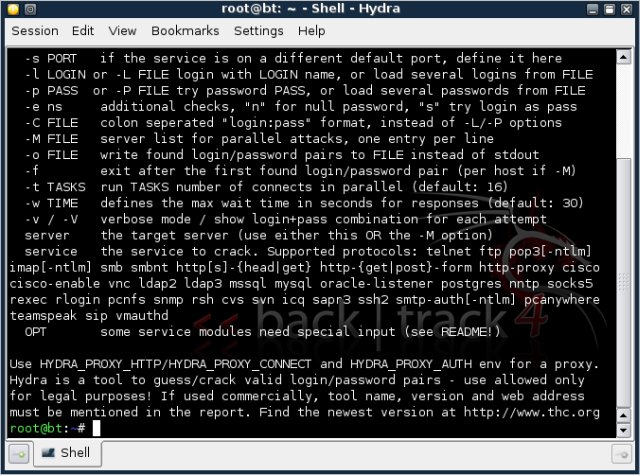
A few practical examples, there's the venerable nmap, Hydra and hping3:

nmap

hydra

Hping3


You may also want to audit Bluetooth devices. On the test machine, there are no Bluetooth devices, which explains the error you see below.

Then, there's the gdb (GNU Debugger) for analyzing crash dumps and memory cores.

Last but not the least, you get the great Wireshark (formerly Ethereal):

Other programs

BackTrack is mainly loaded with security applications, however it also has a reasonable assortment of "normal" programs. You get Firefox, already configured to use the exceptional Noscript extension.


You also get Synaptic, which makes software management easy and pleasant:


You also have Wine for Windows software.

WINE

And then, you can change wallpapers and get classic KDE looks.

Wallpaper

How I miss that wallpaper! To the best of my knowledge, it has not been included in most KDE releases since Kubuntu 6.06.

You can find more stuff in the K-menu:


K-menu

Errors

Being a beta, BackTrack 4 was not the most stable distro. In addition to the Ext4 error during the boot, there were some other problems. For example, both Lynx text browser and QtParted partitioning software refused to work.

Lynx

QtParted

Other things

One thing that may bother you is the issue with the documentation section on the official site. It's secure site, self-signed with an expired certified, at last when this article was written, although the expiration has been in effect since August 2008.

This is not something you expect to see on a site catering to the security-conscious audience.

Furthermore, there's the small issue of inconsistency when it comes to application names. For example, BlueSmash shows up as blue-smash on the command line, hping3 has a capital H in the menus, etc. BackTrack itself also comes in two flavors, with both lowercase and uppercase Ts.

Overall, there were no big issues, except for the occasional application errors.

Conclusion

BackTrack is a powerful hacking suite. It is well made, with stylish touches that add to the overall feel of the distribution. It runs very fast in the live mode, even faster than most installed distributions. Most importantly, the array of tool is rich, well balanced and overall quite impressive.

The Beta version did throw a few errors here and there, but it was nothing major. Small consistency issues also arise, and there's the lack of support for Ext4, which I expect will be solved soon. Documentation needs to be improved, starting with the website SSL certificate and continuing with lots of questions regarding the general usage.

Nevertheless, for security professionals looking for a complete testing package that has all their favorite gadgets neatly arrayed, on top of a stable, popular distribution and with Synaptic package management for easy replenishment of any missing bits, BackTrack is an excellent candidate for their work.


HAVE FUN>>>

Monday, November 8, 2010

BACKTRACK 4 R1... thats what a hacker need

Introduction

BackTrack is the world’s leading penetration testing and information security

auditing distribution. With hundreds of tools preinstalled and configured to run out of the box, BackTrack 4 provides a solid Penetration testing platform ‐ from Web application Hacking to RFID auditing – its all working in once place.

BackTrack is a Linux-based penetration testing arsenal that aids security professionals in the ability to perform assessments in a purely native environment dedicated to hacking

History

BackTrack has a long history and was based on many different linux distributions until it is now based on a Slackware linux distribution and the corresponding live-CD scripts by Tomas M. (www.slax.org) . Every package, kernel configuration and script is optimized to be used by security penetration testers. Patches and automation have been added, applied or developed to provide a neat and ready-to-go environment.

Different version of backtrack.

Date Release

February 5, 2006 BackTrack v.1.0 Beta

May 26, 2006 The BackTrack project released its first non-beta version (1.0).

October 13, 2006 BackTrack 2 first public beta released.

November 19, 2006 BackTrack 2 second public beta released.

March 6, 2007 BackTrack 2 final released.

December 17, 2007 BackTrack 3 first beta release.

June 19, 2008 BackTrack 3 final released.

February 11, 2009 BackTrack 4 first beta release. (It's now based on Debian)

June 19, 2009 BackTrack 4 pre-final release.

January 9, 2010 BackTrack 4 final release.

May 8, 2010 BackTrack 4 R1 release

You can download your new copy of backtarck from :

http://www.backtrack-linux.org/downloads/

Thing you can do with backtrack-4 R1

BackTrack tools are arranged by parent categories. These are the categories

that currently exist:

• BackTrack ‐ Enumeration

• BackTrack ‐ Tunneling

• BackTrack ‐ Bruteforce

• BackTrack ‐ Spoofing

• BackTrack ‐ Passwords

• BackTrack ‐ Wireless

• BackTrack ‐ Discovery

• BackTrack ‐ Cisco

• BackTrack – Web Applications

• BackTrack ‐ Forensics

• BackTrack ‐ Fuzzers

• BackTrack ‐ Bluetooth

• BackTrack ‐ Misc

• BackTrack ‐ Sniffers

• BackTrack ‐ VOIP

• BackTrack ‐ Debuggers

• BackTrack ‐ Penetration

• BackTrack ‐ Database

• BackTrack ‐ RFID

• BackTrack – Python4

• BackTrack – Drivers

• BackTrack ‐ GPU

Conclusion

Backtarck 4 R1 is new realease of distributions where you can get all tools which you want. Whether you’re hacking wireless, exploiting servers, performing a web application assessment, learning, or social-engineering a client, BackTrack is the one-stop-shop for all of your security needs.

Tuesday, October 26, 2010

Window 7's "GODMODE"

Windows 7's so-called GodMode is actually a shortcut to accessing the operating system's various control settings

Although its name suggests perhaps even grander capabilities, Windows enthusiasts are excited over the discovery of a hidden "GodMode" feature that lets users access all of the operating system's control panels from within a single folder.

By creating a new folder in Windows 7 and renaming it with a certain text string at the end, users are able to have a single place to do everything from changing the look of the mouse pointer to making a new hard-drive partition.

The trick is also said to work in Windows Vista, although some are warning that although it works fine in 32-bit versions of Vista, it can cause 64-bit versions of that operating system to crash.

To enter "GodMode," one need only create a new folder and then rename the folder to the following:

GodMode.{ED7BA470-8E54-465E-825C-99712043E01C}

Once that is done, the folder's icon will change to resemble a control panel and will contain dozens of control options. I'm not sure it's my idea of playing God, but it is a handy way to get to all kinds of controls.

For example, the first one could be a folder named "vivek.{00C6D95F-329C-409a-81D7-C46C66EA7F33}"

(use everything inside quotes--but not the quotes themselves).

Here's the list of strings: Try out more example

{00C6D95F-329C-409a-81D7-C46C66EA7F33}
{0142e4d0-fb7a-11dc-ba4a-000ffe7ab428}
{025A5937-A6BE-4686-A844-36FE4BEC8B6D}
{05d7b0f4-2121-4eff-bf6b-ed3f69b894d9}
{1206F5F1-0569-412C-8FEC-3204630DFB70}
{15eae92e-f17a-4431-9f28-805e482dafd4}
{17cd9488-1228-4b2f-88ce-4298e93e0966}
{1D2680C9-0E2A-469d-B787-065558BC7D43}
{1FA9085F-25A2-489B-85D4-86326EEDCD87}
{208D2C60-3AEA-1069-A2D7-08002B30309D}
{20D04FE0-3AEA-1069-A2D8-08002B30309D}
{2227A280-3AEA-1069-A2DE-08002B30309D}
{241D7C96-F8BF-4F85-B01F-E2B043341A4B}
{4026492F-2F69-46B8-B9BF-5654FC07E423}
{62D8ED13-C9D0-4CE8-A914-47DD628FB1B0}
{78F3955E-3B90-4184-BD14-5397C15F1EFC}

And, as a reminder, to create the Godmode folder itself, use this string:

{ED7BA470-8E54-465E-825C-99712043E01C}